Uptime checks
An uptime check requests a URL of your site or API on a schedule, and records whether it answered as expected. A check that keeps failing is down, and each time down is an incident. To be told when a check goes down, add an alert rule.
Open Uptime in the project’s menu, after Hosts. Viewing checks needs view access to uptime and alerts. Adding, changing, pausing, and deleting them needs manage access (Members and roles).
Where checks run
Section titled “Where checks run”Checks run on your Ottertrail instance’s own server, from one location. That is outside the servers your app runs on, unless the app runs on the same machine. If the instance itself is down, its checks do not run either, so watch the instance with a monitor outside it.
The Uptime page
Section titled “The Uptime page”The Uptime page is a list and detail screen: the checks on the left, the selected check on the right. The j and k keys select the next and previous check, and Esc clears the selection. The selection is in the address. On a narrow screen, a check opens its own page. The full description is in Lists and details.
The list holds the project’s checks, oldest first. Each row shows the check’s name, its method and URL, its state, and its uptime over the last 24 hours, with buttons that act at once: Edit, Pause or Resume, and Delete (after you confirm). The bar above the list says how many checks the project has, of at most 50, with Add check.
| State | Meaning |
|---|---|
| Up | The latest runs answered as expected. |
| Down | The check failed its number of times in a row. |
| Pending | The check has not run enough to tell. |
| Paused | The check does not run until you resume it. |
With nothing selected, the right pane, “Checks now”, counts the checks by state, then gives each check’s uptime over the last 24 hours, 7 days, and 30 days, its latest run (the response time, or the failure’s cause), and when it last ran.
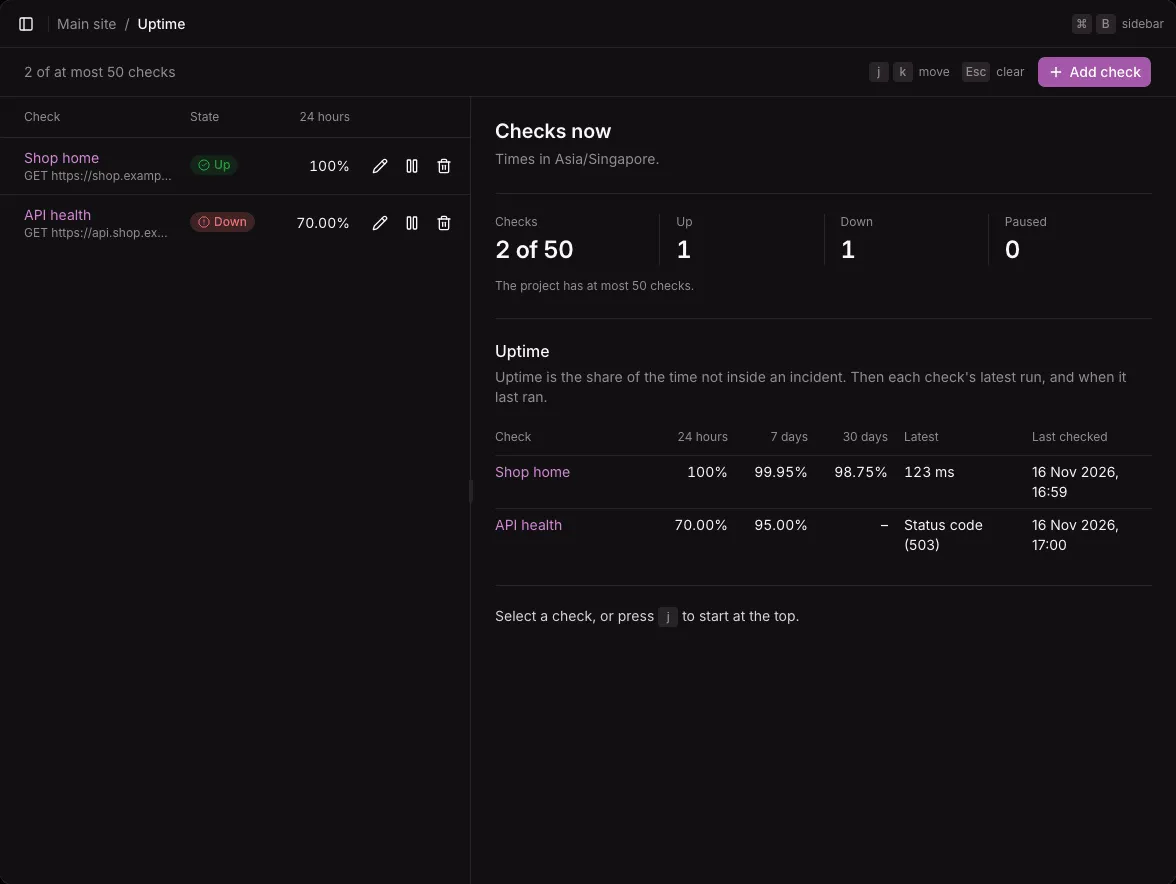
Uptime is the share of the time not inside an incident. It is cut to two decimals, not rounded, so a check that was down at all never reads 100%. A dash means the check did not exist for that whole period. Paused time counts as up. The list is read again every 30 seconds.
Add a check
Section titled “Add a check”-
Select Add check.
-
Fill in the form:
Field Default Notes URL none Starts with https://orhttp://, without a user name or password.Name The URL’s host How often Every 5 minutes Every 1, 2, 5, 10, 15, 30, or 60 minutes Method GET GET or HEAD Timeout (seconds) 10 At most 30 Down after 2 failures in a row 1 to 5 failures in a row Status codes that count as up 200-399 Codes and ranges, separated by commas Word (optional) none Text that must be in the body or must not be in the body. Needs GET. -
Select Add check in the dialog.
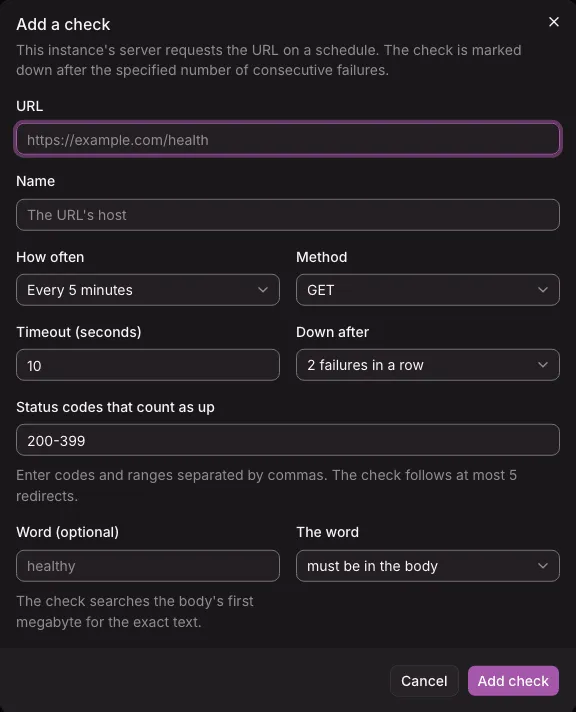
The first run comes at a random moment within the check’s interval, at most 5 minutes after you add it, so checks added together do not all run at once. Editing a check uses the same form. A changed URL counts as a new check: it ends an open incident and starts again as Pending.
What counts as up
Section titled “What counts as up”A run is up when the URL answers within the timeout with a status code in the list, and, with a word, when the body holds the word (or does not). The check follows at most 5 redirects, and reads the first megabyte of the body for the exact word.
A check is down after it fails its number of times in a row (2 by default), so one lost packet does not page anyone. It is up again after one run succeeds.
A failed run names its cause: Timeout, Connection refused, Connection failed, DNS, TLS, Status code, Word, Redirects (more than 5, or one to an address that is not http or https), or Address not allowed.
For an HTTPS URL, each run also records when the certificate expires. An alert rule can warn you a number of days before.
A check
Section titled “A check”The selected check shows its name, URL, how often it runs, and its word, then its state in words, such as “Down since 16 Nov 2026, 09:40: Status code.”. Edit, Pause, Delete, and Open the check’s page follow.
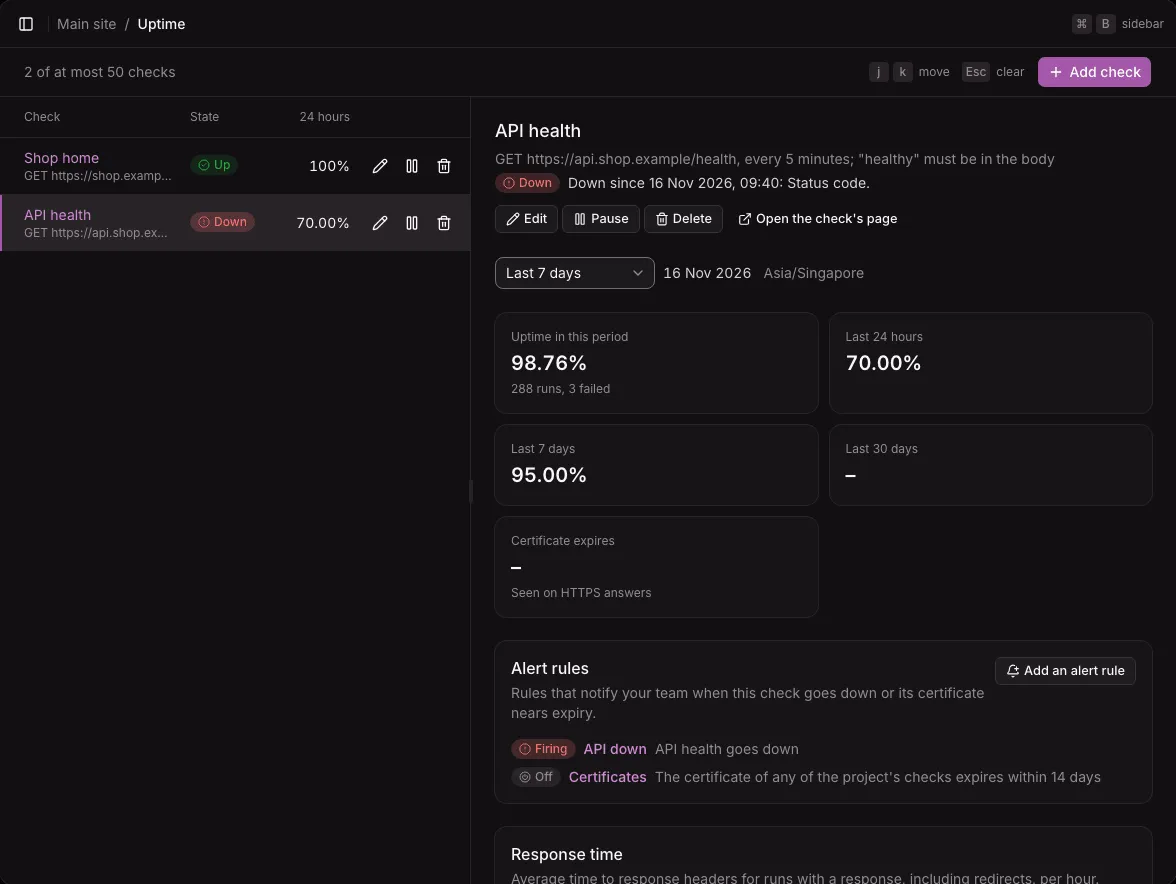
- A period picker, in whole days, and the check’s uptime in that period, with its runs and failures, and over the last 24 hours, 7 days, and 30 days.
- Certificate expires, for HTTPS.
- Alert rules: the rules that watch the check, with their state, and Add an alert rule, which opens the rule form for this check.
- Response time: the average time to the answer’s headers, redirects included, of the runs that got an answer, with “Show the numbers”.
- Incidents in the period, newest first: when each started and ended (Ongoing while it lasts), how long it lasted, and its first cause.
- Latest failures: the latest 20 failed runs, with their cause, status code, time taken, and what happened.
Pause and delete
Section titled “Pause and delete”- Pause stops the check at once. It ends an open incident, and the check starts again as Pending when you resume it.
- Delete asks first, then deletes the check and its incidents. An alert rule that watched only this check is turned off.
Addresses checks may not reach
Section titled “Addresses checks may not reach”A check is a request your instance makes to an address someone types in, so it must not reach what is behind the instance: its databases, the cloud’s metadata service, or the private network. The check’s host is resolved when you save it and before every run, and every redirect is checked the same way.
- A host that resolves to a loopback, private, link-local, shared (CGNAT), multicast, or other internal address is refused. The form says that the host “resolves to an address checks may not reach”, without naming the address.
- Cloud metadata services are always refused.
- Names only in the server’s
/etc/hosts,localhostamong them, do not resolve. - A host that does not resolve yet is saved, and its runs fail with DNS until it does.
On a self-hosted instance, the operator can let checks reach the private network with UPTIME_ALLOW_PRIVATE_ADDRESSES, and block more addresses with UPTIME_DENY_ADDRESSES. See Configuration. Webhook channels follow the same rules.
Limits
Section titled “Limits”- At most 50 checks per project.
- Run results are kept 90 days. Incidents are kept with the check, so uptime reaches further back.
- A host with several addresses is checked on the first one. The others are not tried when it fails.
- Not available yet: request headers, a body, or authentication for a check; checks from several locations; checks other than HTTP; sorting or filtering the checks.