Storage and warnings
PostgreSQL, ClickHouse, Garage, and your backups share one disk in the default install. When the disk is full, the instance stops collecting, and PostgreSQL can stop. The Storage tab shows what fills the disk, and the worker warns you before it is full.
The Storage tab
Section titled “The Storage tab”Open Settings from the workspace menu, then the Storage tab. The owner and admins see it. Members do not.
The instance measures each store when the page opens, each on its own. A store that cannot be measured shows “Could not measure” with the reason, and the others still show. Measure again measures everything again. While it runs, the old figures stay on the page, dimmed. If it fails, the page says that the figures are older.
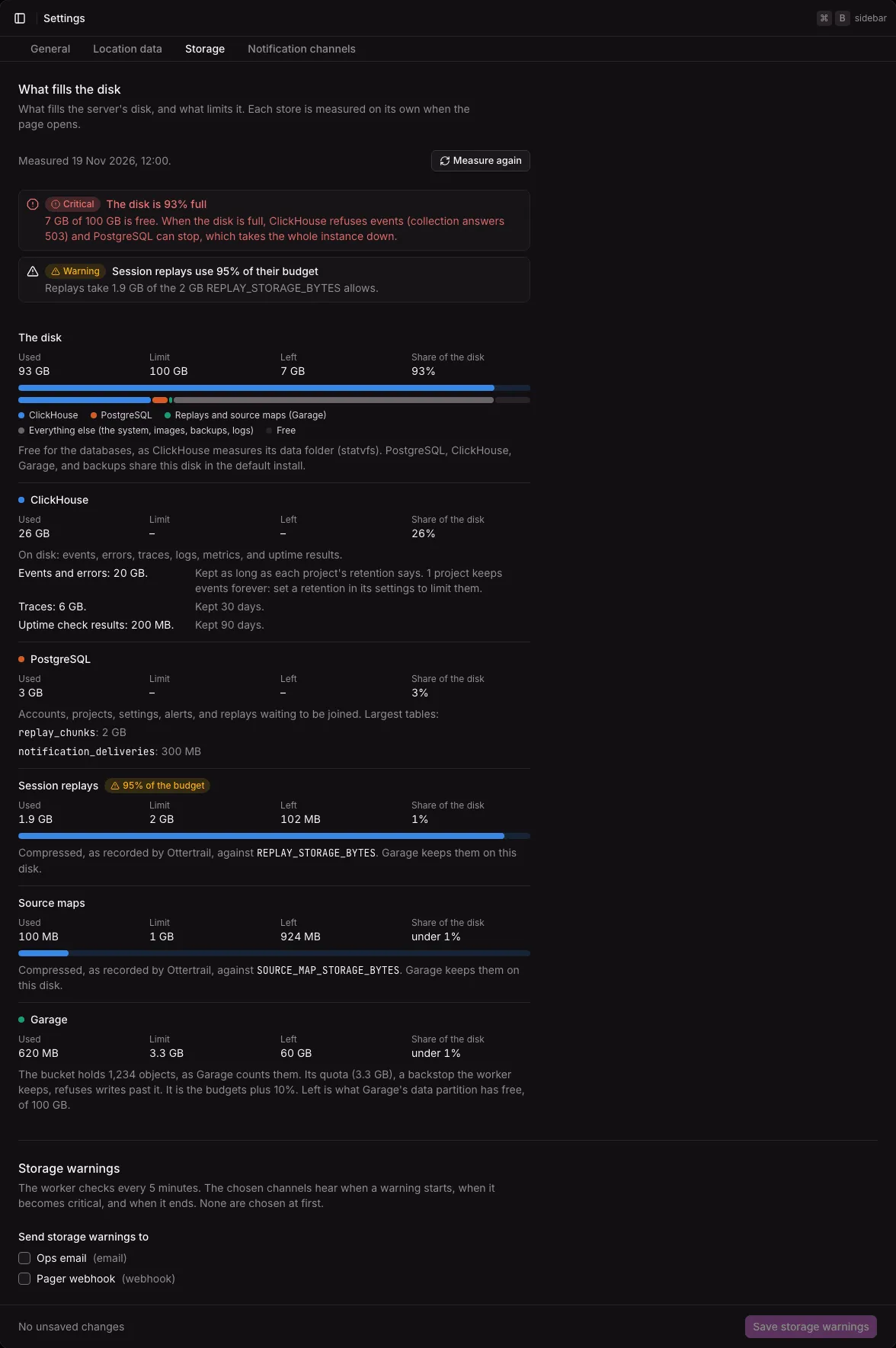
What fills the disk
Section titled “What fills the disk”The section has one row for each store. Each row gives what it uses, its limit, what is left, and its share of the disk.
| Row | Used | Limit | Left |
|---|---|---|---|
| The disk | Its size minus its free space | Its size | Its free space |
| ClickHouse | Each table’s size on disk, with how long the table keeps its data | None of its own: the disk | See the disk |
| PostgreSQL | The database’s size, and its largest tables | None of its own: the disk | See the disk |
| Session replays | The compressed replays that Ottertrail recorded, and the pieces waiting to be joined | REPLAY_STORAGE_BYTES |
The budget minus what is used |
| Source maps | The compressed source maps that Ottertrail recorded | SOURCE_MAP_STORAGE_BYTES |
The budget minus what is used |
| Garage | The bucket’s size and number of objects, as Garage counts them | The bucket’s quota | The free space of Garage’s data partition |
- The disk has a bar of what fills it: ClickHouse, PostgreSQL, the replays and source maps in Garage, everything else (the system, images, backups, logs), and what is free.
- The ClickHouse row says how many projects keep their events forever. Set a retention in a project’s settings to limit them.
- A value that does not exist, or that could not be measured, says so in words, such as “Not measured” or “No limit of its own: the disk”. It never shows as 0.
- With Cloudflare R2, Amazon S3, or another store outside the server, there is no Garage row, and the budgets limit what the store costs, not this disk.
- Without an object store, replays and source maps are off.
The ClickHouse server measures the disk. In the default install, every volume is on the same disk, so that is the disk of every store. A volume that you moved to another disk is not measured on its own.
Garage’s figures need its admin token
Section titled “Garage’s figures need its admin token”Without GARAGE_ADMIN_TOKEN, the Garage row says “Garage’s real usage is not available”, and how to set the token. Everything else works. See Set the Garage admin token.
The warnings
Section titled “The warnings”The worker checks the disk every 5 minutes. The warnings that are on show at the top of the tab, each with a Warning or Critical badge, what happens, and what to do.
| Warning | On when | Why it matters |
|---|---|---|
| The disk is N% full | 80% used is a warning, 90% is critical. A read-only or broken disk is critical. | A full disk stops collection and can stop PostgreSQL. |
| ClickHouse is short of space to merge | Free space is less than twice the largest partition of ClickHouse’s data. Critical when it is less than once. | ClickHouse needs that space to merge its data. Without it, retried events stay counted twice in some reports for longer, and deleted rows stay on disk. |
| The next backup would fail | Free space is less than twice ClickHouse’s data plus twice the replays and source maps | backup.sh needs that much. See Backups and restore. |
| Session replays (or source maps) use N% of their budget | 90% of the budget | At the budget, new replays and uploads are refused. Nothing else breaks. |
| The budgets are larger than the free disk | The room left in the two budgets is more than the disk’s free space. With Garage on the same server only. | Garage keeps replays and source maps on the same disk, so the budgets cannot keep the disk from filling. |
- A warning ends only past a margin, so a figure near a threshold does not start and end a warning on each check. The disk’s warning ends under 78%, critical under 88%, a budget’s warning under 88%. A space warning ends at 10% more free space than its threshold needs.
- A warning whose figures cannot be measured now stays as it was. The page shows it as still on, and says that it could not be measured.
- “No warnings” shows only when every figure was measured. Otherwise a Not checked badge names what was not checked.
What you can do, as the warnings say: copy old backups off the server and delete them, shorten the retention of a project’s events or of telemetry (TELEMETRY_RETENTION_DAYS), lower the replay and source map budgets, or move the instance to a larger disk. See the configuration reference.
Send the warnings to a channel
Section titled “Send the warnings to a channel”The Storage warnings section chooses the notification channels that hear about the warnings. None are chosen at first.
- Under Send storage warnings to, tick each channel.
- Select Save storage warnings.
The section follows the dashboard’s save rule: the button stays disabled until something changes, and leaving the page with an unsaved change asks first. See The save rule.
The chosen channels hear when a warning starts, when it becomes critical, and when it ends. A webhook gets storage.low and storage.recovered (see Webhook payloads).
If the instance has no channels, the section says to add one under Notification channels first. See Notification channels. A channel that you delete leaves the choice.
When the disk is full
Section titled “When the disk is full”The instance keeps the last part of the disk free, so that PostgreSQL and your own commands still work:
- ClickHouse keeps 5% free. It refuses new data while less than 5% of its disk is free. Collection then answers 503 with
Retry-After: 5, as when ClickHouse is down, and the tracker sends the events again later. The results of uptime checks are not stored then, and the worker logs the failure. - First-seen times wait for 7%. After a retention run or a spam delete, the instance rebuilds when each user was first seen. It does this only with 7% of the disk free, and tries again every 5 minutes.
- Budgets refuse first. At
REPLAY_STORAGE_BYTES, new replays are refused. AtSOURCE_MAP_STORAGE_BYTES, source map uploads answer 409. - Garage’s quota is a backstop. With the admin token, the worker keeps a quota on Garage’s bucket: the two budgets together plus 10%. It is never less than what the bucket holds plus the room left in the budgets, so writes within the budgets still fit after you lower a budget. Past the quota, Garage refuses writes. A replay that Garage refuses is tried again on the next run. A source map upload answers 503.
Set the Garage admin token
Section titled “Set the Garage admin token”With Garage on the same server, GARAGE_ADMIN_TOKEN adds two things:
- The Garage row shows the bucket’s real size and objects, and the free space of Garage’s data partition.
- The worker keeps a quota on the bucket, as described above.
It is optional. To set it:
-
Make a random value:
Terminal window openssl rand -hex 32 -
Put it in
.env:Terminal window GARAGE_ADMIN_TOKEN=… -
Apply it:
Terminal window docker compose up -d
Compose passes the same token to Garage, the API, and the worker. Garage’s admin interface is reachable inside the stack only. The instance never logs the token and never shows it. Without a token, Garage takes no admin request.
The token has no use with Cloudflare R2, Amazon S3, or another store. Leave it empty there.
Not available yet
Section titled “Not available yet”- History: growth per day, an estimate of when the disk is full, and the size of each project.