Replays of errors
A replay shows what a visitor saw and did on your site in the moments before an error: the page, their clicks, scrolling, and typing. Ottertrail records only around errors. It never records whole sessions, or a sample of them: a page that has no error sends nothing.
Replays are off until you turn them on. See Turn on session replay. The visitor’s browser masks text, typed values, images, and media before anything is sent. See Masking and privacy.
What a replay holds
Section titled “What a replay holds”A replay is not a video. The recorder takes a copy of the page’s HTML, then records each change with its time: elements added and removed, changed text, clicks, scrolling, and the window’s size. The player builds the page again from these.
- Before the error: the page records all the time, into memory only. It keeps the last 30 to 60 seconds, and drops older parts.
- After the error: the page records 10 more seconds, to show what the error did to the page. Then it sends the recording.
- One replay for each page load. Later errors on the same page load share the replay while it is still recording. Errors after it was sent get none.
A replay does not hold:
- What a
<canvas>draws, the frames of a<video>, and frames from other domains. - Images, fonts, and stylesheets. The player loads these from your site when the replay plays, so an old replay can look a little different after your site changed.
- Network requests, console output, cookies, and storage.
Limits
Section titled “Limits”- Size: at most 2 MB, compressed, for each replay. A larger recording is cut, and the replay shows a Cut badge.
- Leaving the page: browsers send only a small amount of data while a page closes. A visitor who leaves soon after an error often sends only the first part of the replay. Ottertrail keeps what came, cut.
- Storage: the instance keeps at most
REPLAY_STORAGE_BYTESof replays (2 GiB by default), all projects together. Past it, new replays are refused until old ones expire or are deleted. See Limits. - Retention: replays are kept 30 days, then deleted. The errors stay, without their replays.
The Replays page
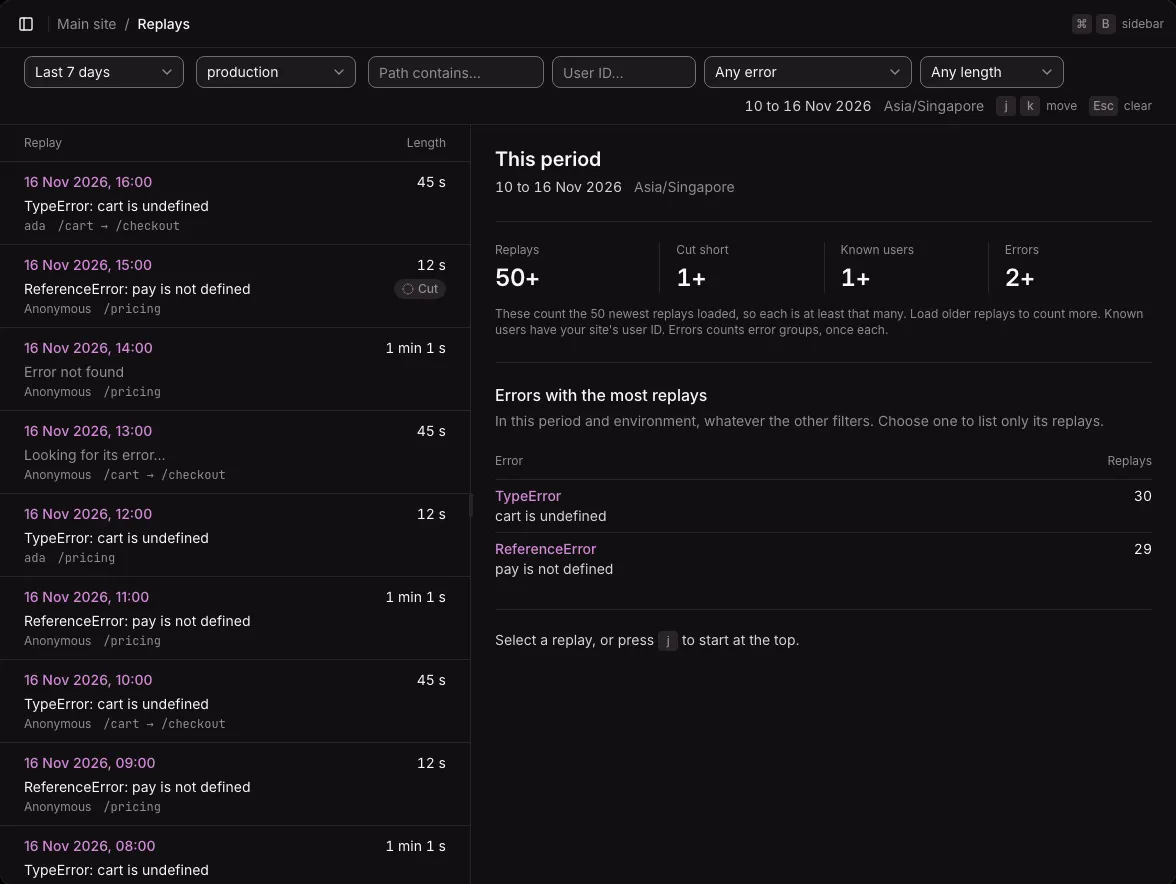
Section titled “The Replays page”Open Replays in the project’s menu, after Errors. It lists every replay of the project, newest first. It works like the other list and detail screens. See Lists and details.
Each row shows:
- When the replay started.
- Its error’s type and message. “Error not found” when Ottertrail did not find the error, or “Looking for its error…” while it still looks.
- The user, or Anonymous, and the pages visited.
- Its length, and Cut when the replay was cut short.
The list loads 50 replays at a time. Load older replays loads more.
Filters
Section titled “Filters”The filter bar holds the period and the environment, as on every page, and four filters. Each is kept in the address.
| Filter | Shows |
|---|---|
| Path contains | Replays that visited a page whose path contains the text. Case does not matter. There are no wildcards. |
| User ID | The replays of one user. |
| Any error | Choose an error group to see only its replays. |
| Any length | A minimum length: 10 s, 30 s, or 1 min. |
A replay whose error was not found has no environment, so it shows in every environment.
The summary
Section titled “The summary”With nothing selected, the right pane sums up the replays loaded: how many, how many were cut short, how many known users, and how many error groups. While older replays wait to load, each figure reads as at least that many (such as “50+”). Under it, Errors with the most replays lists the five errors with the most replays in the period and environment. Choose one to list only its replays.
When the list is empty, the page says why: no replay matches the filters, replays are off for the project (with a link to its settings), the period has none, or the instance has no object store.
Select a replay
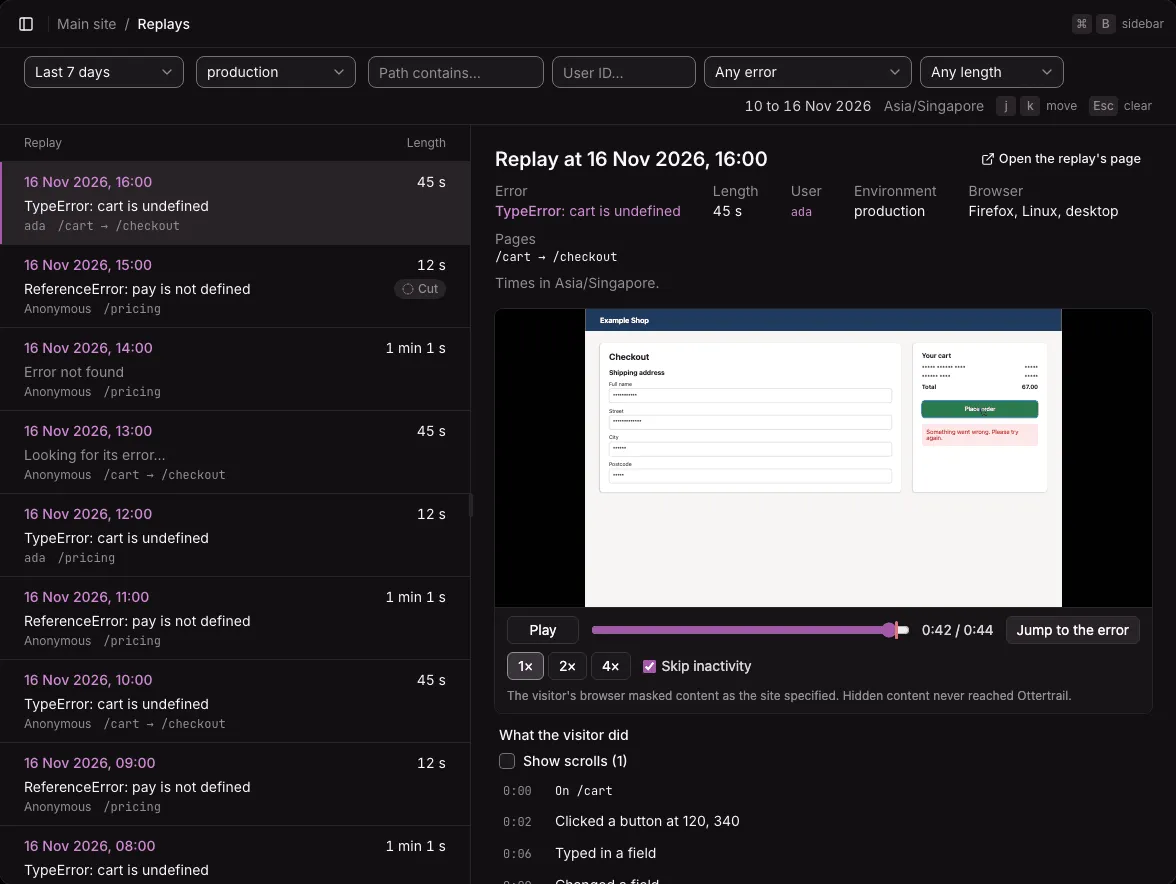
Section titled “Select a replay”Click a row to show the replay beside the list, with its player and timeline. The selection goes in the address (?replay=…). j and k select the next and previous replay, and Esc clears the selection. Open the replay’s page opens it on its own page, where the timeline sits beside the player.
The replay shows its error (a link to the error’s page), length, user (a link to the user’s page), environment, browser, operating system, device, and pages.
The player
Section titled “The player”The player starts at most a minute before the error. Its controls:
- Play and Pause. Space also plays and pauses.
- The timeline, with the error marked on it. The arrow keys move 5 seconds.
- The time played and the replay’s length.
- Jump to the error.
- 1×, 2×, and 4× speeds.
- Skip inactivity, on by default, skips the time when nothing happens.
A line under the player says that the visitor’s browser masked the content, and that hidden content never reached Ottertrail. A replay that has expired says “This replay is unavailable. It may have expired.”
The player runs no script from the recording. A recording can come from anyone who has your public key, so Ottertrail treats it as untrusted, and the replayed page loads images, stylesheets, and fonts only from your project’s allowed sites.
What the visitor did
Section titled “What the visitor did”Beside or under the player, What the visitor did lists the moments of the replay, each with its time:
- The page the replay starts on, and each page change (“Went to /checkout”).
- Clicks, by the kind of element and the place on the screen (“Clicked a button at 120, 340”). The timeline never holds text from the page.
- “Typed in a field” and “Changed a field”. It never says what was typed.
- The error.
Scrolls are hidden until you tick Show scrolls. Click a moment to play from there. The moment the player is at is marked, and the mark follows the player as it plays.
A timeline keeps at most 500 moments. Past that, it leaves out the earliest scrolls first, then the earliest moments, and says so.
In a single-page app, a page change shows when the recorder takes its next full copy of the page, up to 30 seconds later.
From an error’s page
Section titled “From an error’s page”On an error’s page, the latest occurrences have a Replay column:
- Play replay opens the replay in a large dialog, with the player and its timeline. Closing the dialog returns focus to the button.
- Arriving… while the replay is on its way. The page sends it about 10 seconds after the error.
- No replay when there is none.
See Resolving errors.
From a user’s page
Section titled “From a user’s page”A user’s page lists the user’s latest 10 replays. Each error of the user with a replay has Play replay. See The Users page.
Who can watch replays
Section titled “Who can watch replays”Replays show real people, so they are an area of their own. The owner and admins can watch them. A member can watch them only with access to the replays area. See Members and roles.
Not available yet
Section titled “Not available yet”- Network requests and console output beside the replay.
- Searching by what was clicked.
- Replays from mobile apps.